

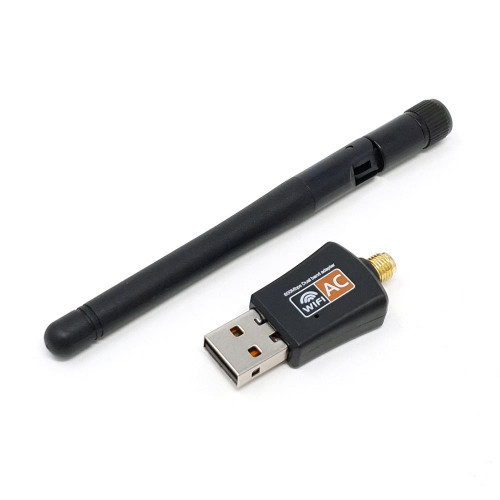


Raspberry Pi Dual-Band 5GHz/2.4GHZ USB WiFi Adapter with Antenna
| SKU: | 16-1 |
| Condition: | New |

Raspberry Pi Dual-Band 5GHz / 2.4GHz USB Wi-Fi Adapter with Antenna
If the on-board Wi-Fi on your Raspberry Pi isn't giving you enough range, this dual-band 2.4GHz/5GHz USB 2.0 Wi-Fi adapter is a solid upgrade.
The antenna supports both 2.4GHz and 5GHz networks, along with the 802.11ac standard (up to 3× faster than 802.11n).
Features
- Up to 150 Mbps at 2.4GHz and 433 Mbps at 5GHz
- External high-gain, adjustable, detachable antenna for wide coverage
- Backward compatible with 802.11a/b/g/n
- LED status light
Tech Specs
- Chipset: Realtek RTL8811CU
- Interface: USB 2.0
- Wireless transmit power: 20 dBm
- Network speed: up to 600 Mbps (max)
- Network mode: Dual-band
- Operating systems: Windows Vista/XP/2000/7/8/10, Linux, macOS
- USB adapter size: 4.5 × 2 × 1.2 cm
- RP-SMA antenna length: 10.8 cm
- Net weight: 12 g
Package Includes
- 1 × Dual-band 2.4G/5G USB Wi-Fi adapter
- 1 × Antenna
- 1 × Driver CD
Note: Raspberry Pi not included.
Installation for old kernels
This installation step is NOT for the current 6.12 kernels. If you are using an up to date Raspberry Pi OS Bookworm or Trixie image (dated December 2025 or newer), PLEASE SKIP.
Driver install takes about 5 minutes. See the installation guide. Consider updating the driver source periodically.
- Raspberry Pi OS 32-bit Bookworm tested (Add
arm_64bit=0toconfig.txt) - Raspberry Pi OS 64-bit Bookworm tested
Tested and approved with Raspberry Pi 3B+, Pi 4 / Pi 400, and Pi 5 by the PiShop Team!
Resources
- Raspberry Pi documentation — The Linux kernel
- Raspberry Pi forum — “After apt upgrade my 32-bit OS runs on a 64-bit kernel and now I can't compile an external module.”
- Raspberry Pi forum — Kernel source for 5.15.61-v8+
- GitHub issue — raspberrypi-kernel-headers 32-bit lacks ARMv8 support
2 Reviews Hide Reviews Show Reviews
-
works find on Pi4B with bookworm
Was not getting enough range with built-in wifi so tried this. It adds at least 5 db to signal so it helps. Installed driver per instructions with no issues. Also turned off built-in wifi by editing /boot/firmware/config.txt to add a new line "dtoverlay=disable-wifi" at the end of the file. After one final reboot the new dongle was on wlan0 and everything worked as before.
-
Works well with R-PI
I didn't think of looking here for installation instructions (I forgot where I ordered it) and ended up installing pre-compiled drivers using a script found here, http://downloads.fars-robotics.net/wifi-drivers/install-wifi, and following instructions found here, https://raspberrypi.stackexchange.com/a/75108/19002 and https://www.raspberrypi.org/forums/viewtopic.php?t=194859 . The installation script automatically found the Realtek vendor:device ID of 0bda:c811, and installed a 8821cu driver for the appropriate version of Raspian.