


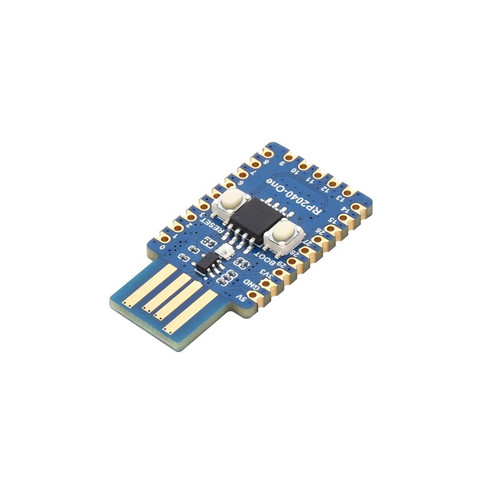


Waveshare RP2040-One, 4MB Flash MCU Board Based On Raspberry Pi RP2040
| SKU: | 969-1 |
Waveshare 22809 - Waveshare RP2040-One, 4MB Flash MCU Board Based On Raspberry Pi RP2040 - RP2040-One
Board Specifications
- RP2040 microcontroller chip designed by Raspberry Pi in the United Kingdom
- Dual-core Arm Cortex M0+ processor, flexible clock running up to 133 MHz
- 264KB of SRAM, and 4MB of on-board Flash memory
- Castellated module allows soldering direct to carrier boards
- USB 1.1 with device and host support
- Low-power sleep and dormant modes
- Drag-and-drop programming using mass storage over USB
- 29 × multi-function GPIO pins (20× via edge pinout, others via solder points)
- 2 × SPI, 2 × I2C, 2 × UART, 4 × 12-bit ADC, 16 × controllable PWM channels
- Accurate clock and timer on-chip
- Temperature sensor
- Accelerated floating-point libraries on-chip
- 8 × Programmable I/O (PIO) state machines for custom peripheral support
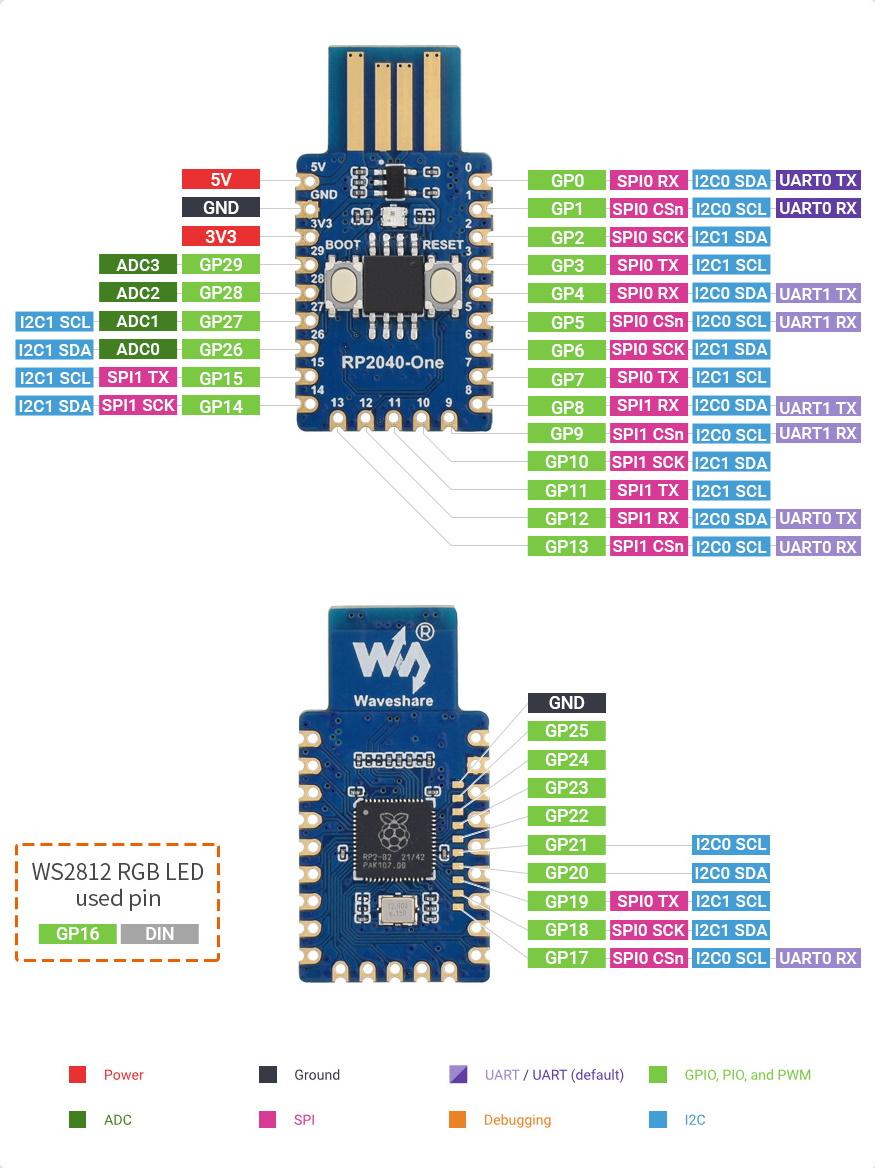
Multi-Function GPIO Pins
What's On Board
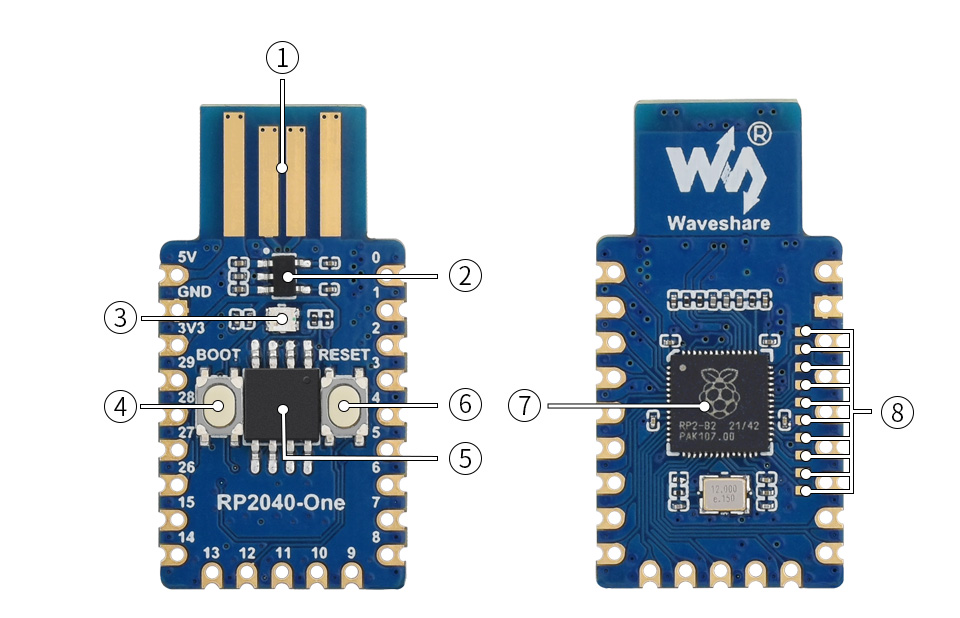
- PCB USB-A port
- RT9013-33GB
500mA low dropout, low noise, ultra-fast LDO - WS2812
RGB LED - BOOT button
press it when resetting to enter download mode - W25Q32JVSSIQ
4MB NOR-Flash - RESET button
- RP2040
dual-core processor, up to 133MHz operating frequency - RP2040 pins
10x solder points, including 9x GPIO pins
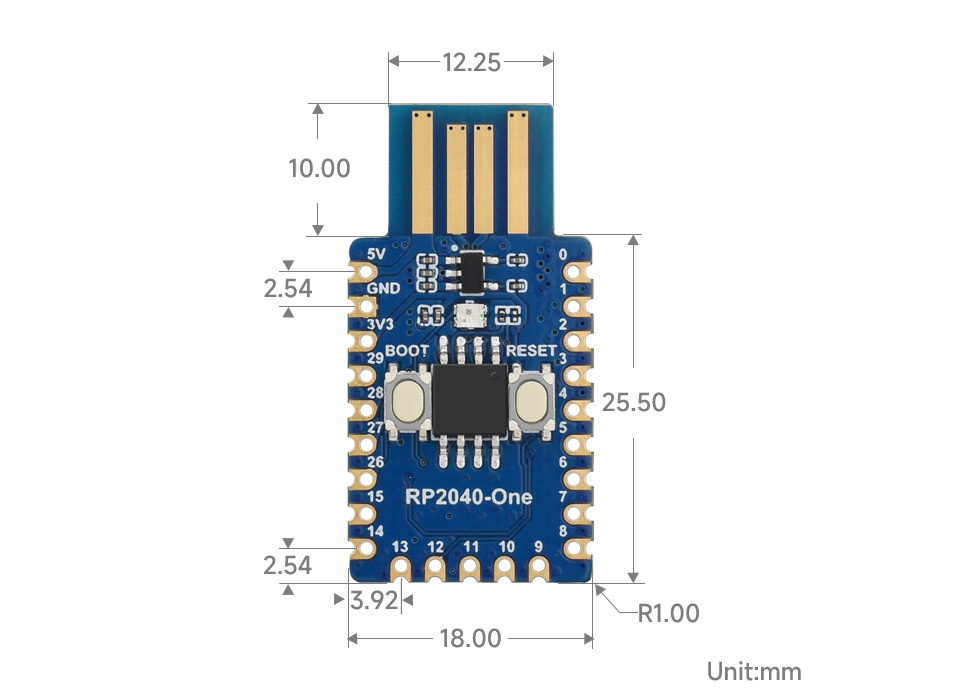
Outline Dimensions
Includes
- RP2040-One x1
Weight: 0.003 kg
Resources
1 Review Hide Reviews Show Reviews
-
RP2040-ONE led control
#
#
# main.py
#
# RP2040-ONE led usage and Temperature Display
#
import time
from machine import Pin, ADC
import rp2
max_lum =100
r =0
g =0
b =0
rgb =0
tm = 100
stm = 5
flag = 1
temp_sensor = ADC(4)
points_per_volt = 3.3 / 65535
# set up 24 bit shift register on pin 16
@rp2.asm_pio(sideset_init=rp2.PIO.OUT_LOW, out_shiftdir=rp2.PIO.SHIFT_LEFT, autopull=True, pull_thresh=24)
def ws2812():
T1 = 2
T2 = 5
T3 = 3
wrap_target()
label("bitloop")
out(x, 1) .side(0) [T3 - 1]
jmp(not_x, "do_zero") .side(1) [T1 - 1]
jmp("bitloop") .side(1) [T2 - 1]
label("do_zero")
nop() .side(0) [T2 - 1]
wrap()
# Create the StateMachine with the ws2812 program,
# outputting to Pin(16) as 24 bit shift register.
sm = rp2.StateMachine(0, ws2812, freq=8_000_000, sideset_base=Pin(16))
# Start the StateMachine, it will wait for data on its FIFO.
sm.active(1)
# Get internal temperature
def read_temp_c():
reading = temp_sensor.read_u16() * points_per_volt
temp_c = 27 - (reading - 0.706)/0.01721
return temp_c
# Set color of Led and Display with 24 bit stream
def colorset():
rgb =(r<<24) | (g<<16) | (b<<8)
sm.put(rgb)
# Color change
def fade():
flag = 1
r=0
g=0
b=0
rgb = 0
while flag<3:
for i in range(0,max_lum):
r=i
b=max_lum-i
rgb =(r<<24) | (g<<16) | (b<<8)
sm.put(rgb)
time.sleep_ms(stm)
time.sleep_ms(tm)
for i in range(0,max_lum):
g=i
r=max_lum-i
rgb =(r<<24) | (g<<16) | (b<<8)
sm.put(rgb)
time.sleep_ms(stm)
time.sleep_ms(tm)
for i in range(0,max_lum):
b=i
g=max_lum-i
rgb =(r<<24) | (g<<16) | (b<<8)
sm.put(rgb)
time.sleep_ms(stm)
time.sleep_ms(tm)
flag = flag + 1
# fade in color and intensity
# demonstrating led usage in one way
fade()
stm = 700
#
# or... here is another way
#
# set up 24 bit led colors to send to ws2812
#
# Led off
r=0
g=0
b=0
LOFF =(r<<24) | (g<<16) | (b<<8)
# White
r=60
g=60
b=60
White =(r<<24) | (g<<16) | (b<<8)
# Red
r=80
g=0
b=0
Red =(r<<24) | (g<<16) | (b<<8)
# Green
r=0
g=80
b=0
Green =(r<<24) | (g<<16) | (b<<8)
# Blue
r=0
g=0
b=80
Blue =(r<<24) | (g<<16) | (b<<8)
sm.put(LOFF)
time.sleep_ms(stm)
sm.put(Red)
time.sleep_ms(stm)
sm.put(White)
time.sleep_ms(stm)
sm.put(Blue)
time.sleep_ms(stm)
sm.put(Green)
time.sleep_ms(stm)
sm.put(LOFF)
time.sleep_ms(stm)
# Colors do not seem to blend
# only white,red,blue,green,off
# but here is a way to try a blend
stm = 900
r=10
g=0
b=0
colorset()
time.sleep_ms(stm)
time.sleep_ms(stm)
time.sleep_ms(stm)
sm.put(LOFF)
time.sleep_ms(stm)
# Show internal temperature
print("-------------------")
temp_c = read_temp_c()
print(temp_c, "deg Celcius")
temp_f = ((9 * temp_c)/5) + 32
print(temp_f, "deg Farenheit")
print("-------------------")
# State machine used as shift register set to Off
sm.active(0)